
Markdown Support
Learn about the Markdown syntax supported by Moire
Apple Notes’ rich text format is complex. Moire supports converting it to a basic set of Markdown syntax. Here is the feature list.
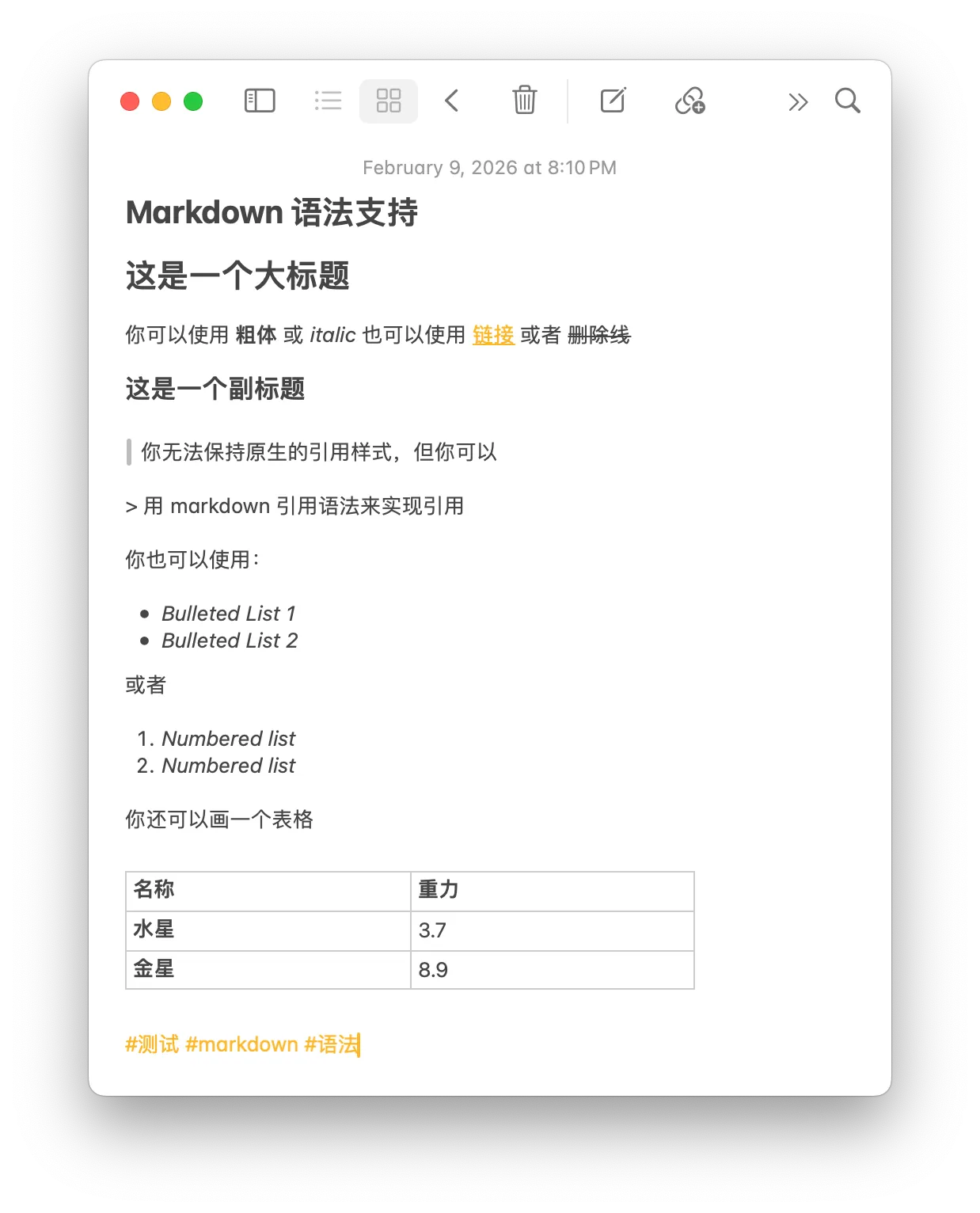
Supported Features
Section titled “Supported Features”Text Formatting
Section titled “Text Formatting”| Syntax | Result |
|---|---|
**Bold** | Bold |
*Italic* | Italic |
~~Strikethrough~~ |
Headings
Section titled “Headings”## Level 2 Heading### Level 3 HeadingOnly H2 and H3 are supported, corresponding to Notes’ Title and Subtitle. This is because Subheading in Notes is actually the same size as the body text and cannot be effectively distinguished.
[Link Text](https://example.com)Result: Link Text
Unordered List:
- Item 1- Item 2 - Sub-item 2.1Ordered List:
1. Step One2. Step Two3. Step ThreeTask List:
* [ ] TODO 1 * [x] TODO 1.1* [ ] TODO 2 * [ ] TODO 2.1Code Blocks
Section titled “Code Blocks”Monostyled text in Apple Notes will be converted to Markdown code blocks.
a = 5b = 10a, b = b, aprint(f"a is now {a}, b is now {b}")Quotes
Section titled “Quotes”> This is a quote> Used to emphasize important contentResult:
This is a quote Used to emphasize important content
Images
Section titled “Images”Tables
Section titled “Tables”Preview:
| Header 1 | Header 2 |
|---|---|
| Content 1 | Content 2 |
Known Issues
Section titled “Known Issues”Style Loss
Section titled “Style Loss”Bold, italic, and other styles may be lost if there are leading or trailing spaces in titles or body text.
Sync Inconsistencies
Section titled “Sync Inconsistencies”iOS and macOS export styles differently. iOS loses styles in titles and generates more empty line breaks (though usually not visible on the page).
macOS Title Behavior
Section titled “macOS Title Behavior”On macOS, the first line of a note is always treated as a Bold Level 2 Heading by the Shortcuts API, regardless of its original formatting.
Best Practices
Section titled “Best Practices”1. Keep It Simple
Section titled “1. Keep It Simple”Use basic Markdown syntax and avoid relying on advanced features.
2. Use Lists Wisely
Section titled “2. Use Lists Wisely”Lists are easier to read than large blocks of text. Benefits:
- Concise and clear
- Easy to scan
3. Use Images Appropriately
Section titled “3. Use Images Appropriately”A picture is worth a thousand words, but don’t overdo it (limit 1).
Next Steps
Section titled “Next Steps”Learn more about image upload mechanisms and limitations.